This is the full setup, in the order I'd build it in if I were starting again from scratch.
One folder for everything
Everything in AI comes back to files in folders. I went through a phase of building a separate setup for every part of the business. A marketing one, a finance one, a content one. Felt organised. Was a nightmare.
Every job made me pick a folder first, and half of them crossed over anyway.
Now it's one folder- my desktop, more by accident to begin with than by design, but it's become the operating system. Everything happens inside it.
In the desktop folder, I have a folder for each Project one per business, one called personal, and one called active for the odd jobs that don't belong anywhere yet.
Don't spend an afternoon designing this. It grows as you use it.
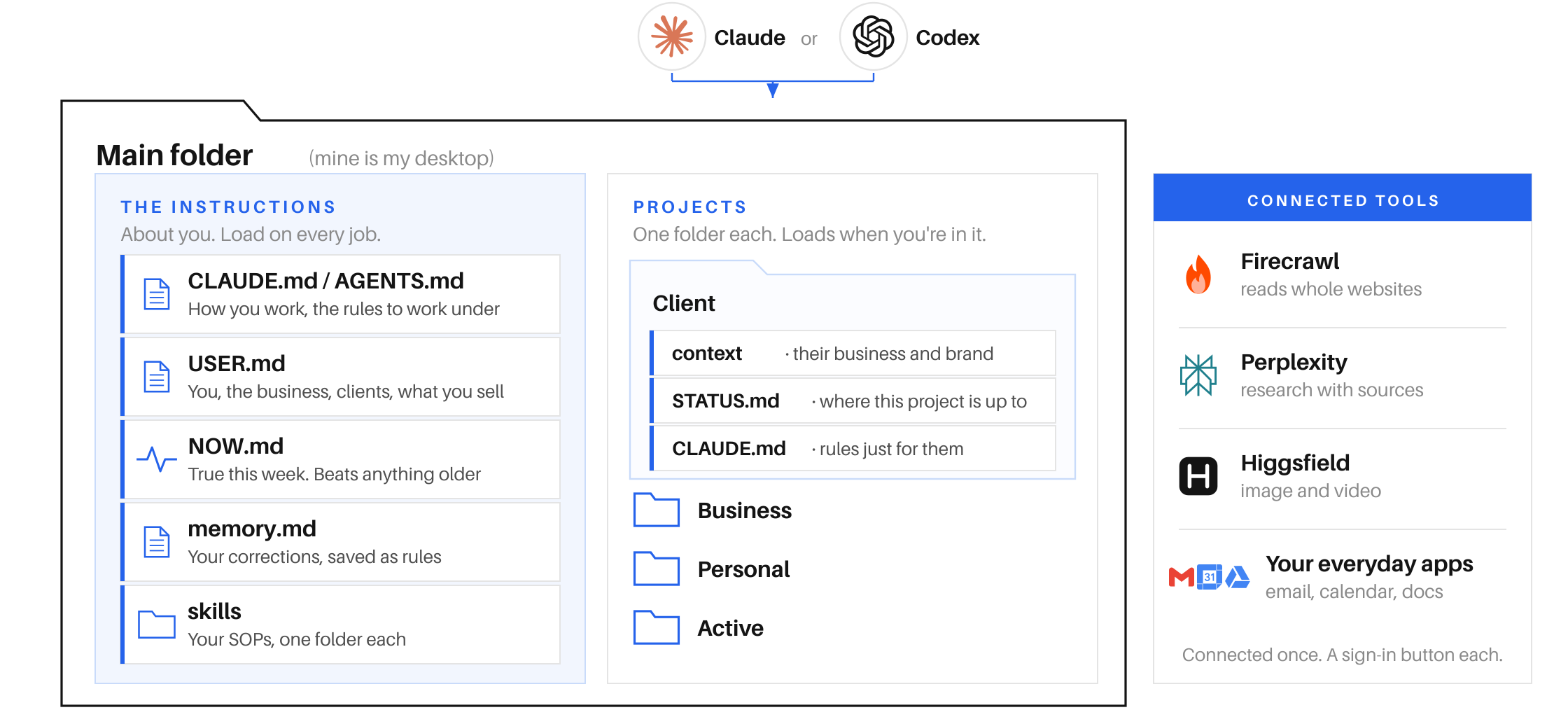
CLAUDE.md or AGENTS.md: The file the agent reads automatically when opening any folder
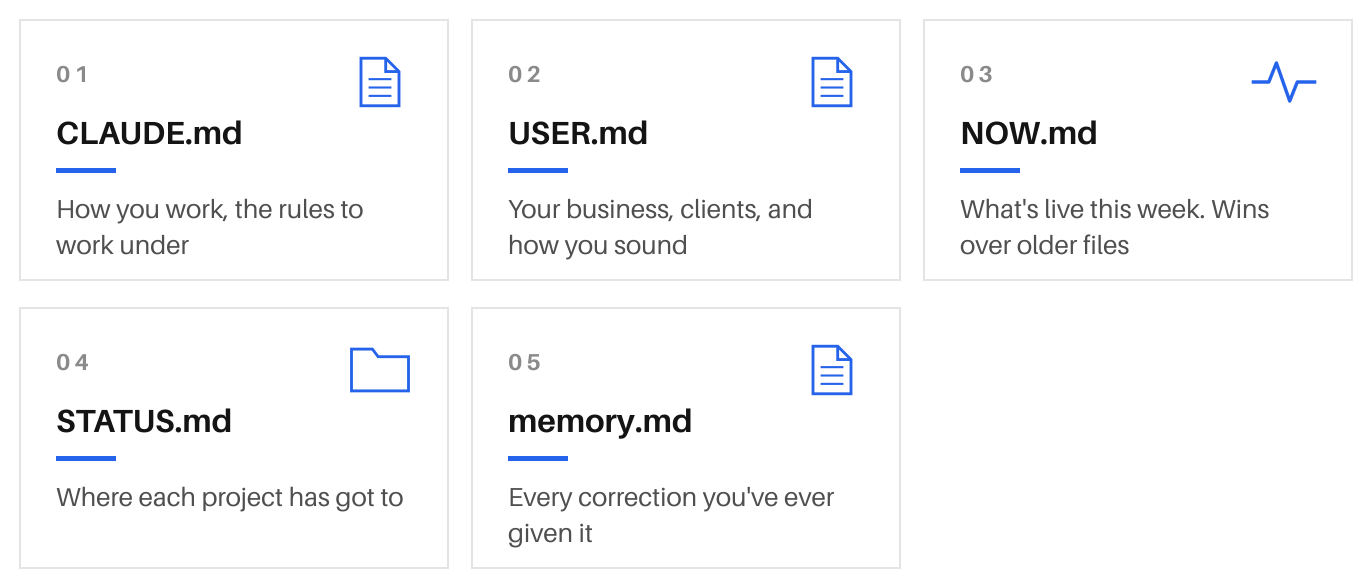
Inside your main folder, you should have a file called CLAUDE.md or AGENTS.md. These are the same thing but Claude makes it difficult by having its own name vs the standard agents.md used by Codex and other LLMs.
Ask Claude or Codex to make it and it will interview you about the business and optimise the setup- then write the file from your answers. It's the agent's guide to everything else in your system.
.md- means 'markdown' file type. If you haven't come across it, it is a plain text file with basic formatting. Headings, bullets, bold. That's all it is. Same as Word .docx files or .pdf.
This file matters because it's read automatically at the start of every session. You never have to remember to mention it, Claude or Codex will read it every time.
It includes what's true regardless of the job who you are, what the business is and the rules to work under. For example, mine tells Claude to add the CLAUDE.md file and a STATUS.md to all new projects- so regardless of what I'm working on it's always up to date.
Keep it tight. It loads into every job you run, so a bloated one eats your context memory before you've even started a session. It should be a tight map to the headlines and everything else it needs to reference. Nothing else.
USER.md: everything about you and the business
Your CLAUDE.md holds how you work. This holds what you do, who you are, what the business does, who your clients are, how you sound, what you sell and what it costs.
Your CLAUDE.md should point at it everything about me and the business is in USER.md, read it before you start.
Take time getting this one right & when it gets too long, split it into a folder called context. A file each for you, the business, your clients, how you sound. Point CLAUDE.md at the folder instead of the file.
Keep clients out of it. USER.md is about you, and it loads on every job.
Each client gets their own folder with their own context in it. That way you're not carrying a specific client's brand guidelines around while you write your own newsletter.
NOW.md: what's true this week
Everything so far is durable. Still right in six months.
But that's not helpful for the live stuff you're working on this week or deals you have in the pipeline.
Keep one short file called NOW.md. Live state what you're working on, which deals are live, what changed, what you're waiting on.
In your CLAUDE.md, you should have a line telling Claude to update NOW.md when status of a live project changes- if NOW.md disagrees with anything older, NOW.md is right.
Keep it to a page if a section grows past a couple of sentences, that detail belongs with the project it came from.
This is the difference between an AI that knows your business and one that knows your business today.
STATUS.md: where each project has got to
Claude should know to add a STATUS.md to every project folder.
Where that piece of work has got to, what's agreed, what's next, what you're waiting on, what you decided and why you decided it.
Tell Claude to update it as you work. You're not writing these by hand. They get written as a side effect of doing the job.
The rule that keeps it clean one line per project in NOW.md, the detail in that project's STATUS.md. If NOW.md starts getting long, detail has crept into the wrong file.
memory.md: so you don't repeat corrections
In your CLAUDE.md there should be one line which says
'when I correct you, write the lesson into memory.md as a rule, and check that file before every job.'
Say "stop signing off emails like that" once, and the memory stops it happening again.
Both Claude & Codex have their own memory built in now- but you can ask to see it and they will pull it up for you. I have a scheduled upload to Dropbox for this and the others in case I ever lose my laptop or something gets deleted so I know it's always there.
Top tipAsk Claude or Codex to review the memory and clear it out every few months or the rules start contradicting each other.
Connecting your tools
An agent with no access can only talk to you.
Connecting to external tools runs through something called an API or an MCP a translator that lets your agent talk to other software- you don't need to know how.
You can connect to the vast majority of these in the settings section of Codex or Claude (it's as simple as a toggle and a sign in) or you can search for the API or MCP manually - or just ask Claude to do it for you. The ones I can't live without are Firecrawl search & scrape (see last month's article) Perplexity, Higgsfield for access to most image & video models.
Skills: your SOPs *Standard Operating Procedures
A skill is a written process the agent follows for a specific task. Nothing more than the step-by-step process and expectations doc you'd write for a new assistant.
Each skill is just a folder with a file in it. The file has three parts a name, one line on when to use it, and the steps. That one-line description is important- the agent doesn't carry all your skills around from thread to thread.
It sees the names and descriptions like spines on a bookshelf, and pulls the right one down when the job calls for it. This process works most of the time without you needing to ask, but you can also 'invoke' skills by using a / command which triggers it to be used.
There's a tonne of skills out there to try- most are totally free and accessible on GitHub (where developers store and share code). People publish them on GitHub and stars tell you which ones are worth downloading. Here are the highest leverage ones I'd take with me if I could only have a few:
/firecrawl: reads whole websites properly, not just search results. Point it at a competitor and you have their pricing, positioning and claims in a document in seconds.
/impeccable: reviews and improves any web page or interface. It tells you what's wrong with it and then fixes it.
/emil-design-eng: the detail layer on anything you build. Spacing, motion and the small things that make something feel considered rather than assembled.
/visual-hierarchy: makes a page read in the right order, so what matters most is what gets seen first.
/handoff: hands a long session over to a fresh one without losing the thread. For when a conversation has run all day and started to wander.
/email-voice: writes emails in your own voice. Build one for any voice you write in regularly and you never start from a blank page again.
Which brings us on nicely to how to build a skill…
How to build a skill: think of training a new team member
Do the job together.
Save the steps.
Ask them to try.
Refine until they get it right every time.
Lock it in.
Everyone assumes you sit and write these upfront. I never do.
Do a job start to finish with it once, correcting as you go. Then say 'save that as a skill so we can do the same next time.' It builds the skill file for you- key process points, corrections and tools included.
The first version won't be right. Mine are sometimes infuriatingly difficult to nail. Get to 80% and the rest comes from reps when something's off, tell it what's off and update the skill.
Like training a new employee, it's a time investment upfront. Once it's nailed, that job gets done your way every time.
You'll start to spot that some jobs & processes are just skills stacked together. So make an overarching skill whose steps include the smaller skills. That's all an automated workflow is.
Sharing and managing skills with your team
Building great skills for repeatable work is where you unlock real leverage for your team.
A contracting skill, a proposal deck skill, your company brand voice or brand guide- these need to be consistent and available across the team. Over time- the aim is to download your best people's knowledge into a brain that's accessible to all.
You should NOT send a skill to someone else and hope for the best- the result will be that their Claude or Codex will inevitably make changes and you will very quickly have a bunch of different versions floating around with no source of truth.
If you rely on Google Drive or Dropbox that throws in its own issues with a larger scale team symlinks and other technical things you don't need to be aware of.
Then I landed on this: push all of your skills to a GitHub repository and make it a plugin.
Your enterprise setup will give the full organisation that plugin which means you're all sharing the same system.
The mistake I made
Overcomplicating it. You need simplicity and clarity- you'll find once you've done this once you get to a stage where the system is too complex and nothing works quite as well as it used to. Tell Codex or Claude to review the setup and strip out the crap. I've been anxious every time I've done this and never once have I missed anything that's gone.
Where to start
Read what it writes before you keep it. It's building from your answers, so anything slightly off in there gets repeated in everything it does for you afterwards.
Connect two tools you're in every day.
Then try to get through a whole working day just doing work through Claude or Codex. It will be slow and painful once but that investment is all that's standing between you and coming out the other side.